


KidsGuard Pro-Phone Monitoring
3.8101.00 Reviews
App Specs
- Version
- 3.2.1
- Updated On
- License
- Free
- Downloads
- 1,000,000+
- Developer
- CLEVERGUARD TECHNOLOGY CO.,LIMITED
- Categories
- Parenting
- Platform
- Android, iOS
Screenshots
 Analysis by AppCompare
When a child’s phone starts to feel like a black box, it’s tempting to look for a tool that promises to explain everything. My view is that KidsGuard Pro-Phone Monitoring is most useful when a parent has a clear, limited safety concern and wants a structured way to respond—not as a substitute for trust or a reason to inspect every conversation. Its appeal is the combination of location awareness and controls, but the way a family uses those tools matters just as much as the features.
That distinction is important because phone monitoring can easily become more intrusive than intended. I’d decide in advance what I’m trying to solve—such as checking a child’s location after an agreed journey or setting boundaries around app use—and explain the plan in age-appropriate language. If the goal is simply to reduce arguments about screen time, a transparent family agreement or the phone’s built-in controls may be a better first step.
What makes it useful in a family routine
KidsGuard Pro is a parenting app from CLEVERGUARD TECHNOLOGY CO.,LIMITED. It is free to install, has an Everyone content rating, and is currently at version 3.1.2, with Android support beginning at version 8.0. The app has an average rating of 3.9 from around 2.8 thousand ratings, alongside 86 written reviews and over one million installs. Optional in-app purchases range from $4.99 to $259.99 per item, so I would check what a chosen plan includes and its ongoing cost before relying on it.
Its central value is bringing several parenting jobs into one place: keeping an eye on a child’s location, managing screen time, and blocking selected apps or games. That combination is more practical than a tool that only reports location if the real household problem is a mix of late-night use, distracting games, and uncertainty about whether a child has reached an agreed destination.
A realistic example is a teenager taking public transport home after an after-school activity. Location tracking can help a parent check whether the trip is progressing as expected, while an agreed screen-time limit can keep gaming from taking over homework time later. I would use those controls as part of a conversation—what the limits are, when they apply, and how a child can ask for an exception—rather than quietly changing settings whenever a disagreement comes up.
Controls work best when expectations are clear
The app’s usefulness depends on choosing a small number of rules that match the child’s age and routine. For example, a parent might set a boundary around games during homework hours while leaving school, reading, or communication apps available. That is a more focused use of an app blocker than trying to remove every distraction at once, which can turn a safety tool into a source of daily conflict.
Location checks also need context. A phone may not be in the same place as its owner, and a location view is not a conversation with the child. If a map result looks unexpected, I’d first ask what happened instead of treating it as proof of misbehavior. Agreeing when location will be checked can also prevent a teenager from feeling watched throughout the day.
Worth Reading Before You Choose

Flipboard Shows What News Apps Must Do Beyond the Feed

Switching to Android Auto Means Rethinking Your Driving Routine

Google Calendar Makes a Crowded Week Easier to Manage

Ludo King Makes the Most of the Minutes Between Plans

Baby Panda World Brings Quick Play to Modern Phones, but Its Game Library Feels Busy

ESPN’s Live Game View Makes Following Close Games Easier
Before setting up monitoring, I’d sit down with the child and explain what information the parent intends to use and why. That approach does not make every limit negotiable; it makes the limits understandable. It also gives the family a chance to decide which settings are appropriate now and when they should be reviewed as the child becomes more independent.
Setting Up and Getting Started
First things first, setting up KidsGuard Pro is surprisingly simple. You don't need to be a tech whiz to figure it out. Once you register an account on their website, you'll get a step-by-step guide on how to install the app on the target device. I was pleasantly surprised at how straightforward it was. It took me about 5 minutes, tops!
Now, here's the cool part: the app operates in stealth mode. Yup, you read that right. It’s like a ninja on the target device—completely invisible and undetectable. So, if you're worried about the person discovering the app, you can chill. They won’t know it’s there.
Features Galore
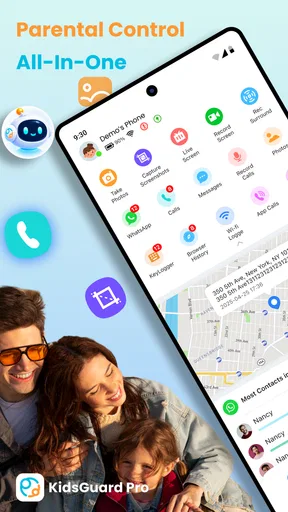
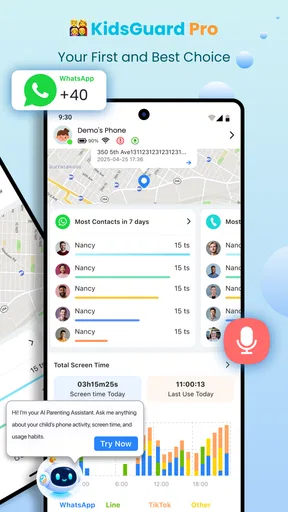
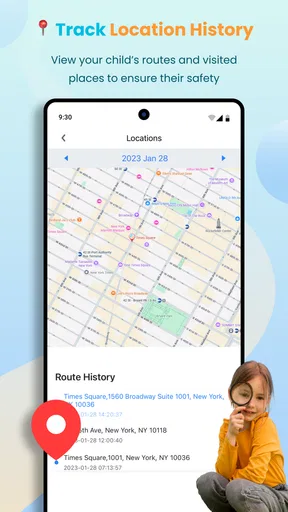
Let’s talk features because this app is packed with them. First up, real-time location tracking. You can see exactly where the device is at any given moment. It's like having a GPS tracker on steroids. I found this particularly helpful if you’ve got teenagers who swear they're "just at the library."
Then there’s the call and message monitoring. You can see all incoming and outgoing calls, and even sneak a peek at deleted messages. I mean, how often do kids delete their chats thinking they’re safe, right?
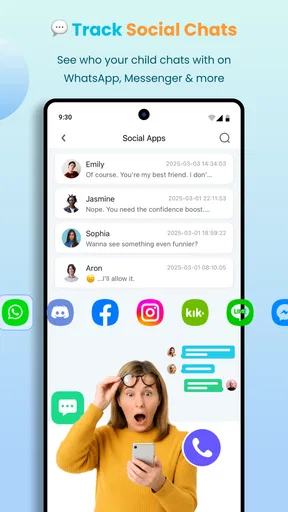
Also, if you’re curious about what’s happening on social media, KidsGuard Pro has you covered. Facebook, WhatsApp, Snapchat—you name it, they monitor it. I spent an entire afternoon just scrolling through the Instagram activity. It’s like being a fly on the wall!
Oh, and let’s not forget about the internet history tracking. Whether it’s YouTube or random websites, you get a full breakdown of all activities. Super handy if you want to make sure they’re not wandering into any sketchy online territory.
User Experience
Overall, navigating the app is a breeze. The dashboard is intuitive and user-friendly, even for someone like me who isn’t exactly a tech guru. Everything is neatly organized, and the data syncs up pretty quickly. You don’t have to wait around forever to see updates.
One thing I noticed is that the app doesn’t seem to drain much battery on the target device. It’s a small thing, but pretty crucial if you don’t want the person getting suspicious about their phone suddenly dying on them.
Where it differs from simpler options
Compared with the built-in family controls many phones offer, KidsGuard Pro takes a broader monitoring approach. Built-in tools can be enough when the only need is a basic screen-time schedule or app limit, and they may feel more suitable to families that want visible, device-level boundaries. KidsGuard Pro is more compelling when a parent wants location tracking alongside app and game controls, but the wider scope also calls for more care about consent, privacy, and which information is genuinely necessary.
I would not choose it for a family that only needs occasional reassurance about a child getting home safely. A direct check-in, a shared plan for travel, or a simpler location-sharing arrangement may involve less oversight. It is also not a good fit for monitoring a partner or another adult without their knowledge and consent. The fact that a tool can collect information does not make covert access a healthy or appropriate way to handle a relationship concern.
Another practical trade-off is that a monitoring dashboard can create more information than a parent needs. Rather than checking every available category out of habit, I’d decide which signal matters for the current concern, such as whether an agreed location has been reached or whether a specific app is disrupting sleep. Reviewing less can make it easier to notice a genuine pattern and less likely that ordinary private conversations become a source of unnecessary conflict.
Questions I’d settle before installing
Does it work for a younger child or a teenager? The right answer depends less on a particular age than on the child’s maturity, the family’s safety needs, and local expectations about privacy. For a younger child, a parent may reasonably need more direct supervision; with an older teenager, clear boundaries and a narrower set of checks are usually easier to justify. The Everyone content rating describes the app’s content classification, not whether every monitoring practice is suitable for every family.
Will it replace a conversation about online safety? No tool can explain why a child clicked a link, felt pressured in a chat, or is having trouble with friends. Monitoring may give a parent a reason to start a discussion, but the useful response is to listen and agree on what to do next, not assume an activity record tells the whole story.
What should I do if a control feels too restrictive? I’d review the rule with the child and test whether a narrower schedule or a smaller set of blocked apps addresses the issue. If the family’s main need is a simple bedtime routine, a built-in downtime setting may be easier to maintain than a more extensive monitoring arrangement. If the concern is a child’s immediate safety, location tools may be more relevant than reviewing a wide range of activity.
Is It Worth It?
Now, let’s talk about the big question: is it worth it? Honestly, if you’re a parent who wants to keep tabs on their kid’s online activities or even a partner who’s feeling a bit uneasy, KidsGuard Pro offers a lot of peace of mind. The plethora of features alone make it a solid option.
That being said, make sure you’re using it responsibly. It’s a powerful tool, and with great power comes—well, you know the drill. Always consider the ethical implications and have open conversations if possible.
In conclusion, if you’re looking for a comprehensive phone monitoring solution, I’d say give KidsGuard Pro a shot. It’s reliable, easy to use, and covers all bases. And hey, a little extra peace of mind never hurt anyone, right?
Check it out if you're intrigued, and let me know what you think. Until next time, happy monitoring!
My recommendation
I’d consider this app if I were a parent who needs location awareness and practical limits in the same setup, has a specific reason for using them, and is prepared to explain the arrangement to my child. I’d start with one or two boundaries, review whether they help, and avoid treating every available monitoring option as something that must be switched on.
If all I needed were a basic screen-time reminder, I’d start with the phone’s built-in family settings. If I wanted a relationship conversation, I would not use monitoring as a substitute for it. KidsGuard Pro makes the most sense when its broader controls answer a real parenting need; used without a clear purpose, that breadth can become intrusive rather than reassuring.
Pros
- Easy installation process.
- Comprehensive monitoring features.
- User-friendly interface.
- Real-time location tracking.
- Stealth mode operation.
Cons
- Requires physical access for setup.
- No free trial available.
- Limited iOS features.
- Potential privacy concerns.
- Not suitable for older devices.
FAQs for KidsGuard Pro-Phone Monitoring
What is KidsGuard Pro and how does it work?
KidsGuard Pro is a comprehensive phone monitoring application designed to help parents keep track of their children's online activities. Once installed on a target device, it allows you to monitor calls, messages, browsing history, and social media interactions through a secure online dashboard. The app operates in stealth mode, ensuring that it runs discreetly in the background.
Is KidsGuard Pro legal to use?
Using KidsGuard Pro is legal as long as it complies with applicable laws and regulations. It is essential to have consent from the device owner or ensure you are the legal guardian of the person being monitored. Unauthorized use for tracking individuals without their consent may violate privacy laws and result in legal consequences.
What devices are compatible with KidsGuard Pro?
KidsGuard Pro is compatible with both Android and iOS devices. For Android, it supports versions from 4.0 and up, while for iOS, it works with all devices running iOS 9.0 or later. It’s important to check for specific compatibility requirements on the KidsGuard website before downloading to ensure smooth operation.
How does KidsGuard Pro ensure user data privacy and security?
KidsGuard Pro prioritizes user data privacy by implementing robust encryption protocols to protect all monitored data. The app adheres to stringent privacy policies and does not share data with third parties. Users can access data securely through an encrypted connection to their online dashboard, ensuring information is kept confidential.
What features does KidsGuard Pro offer for monitoring?
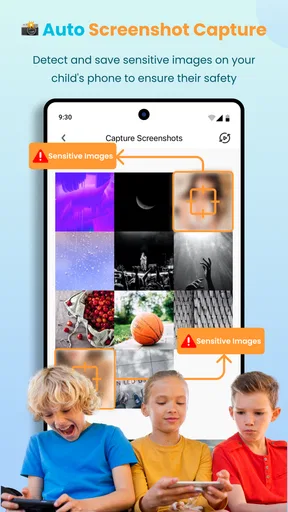
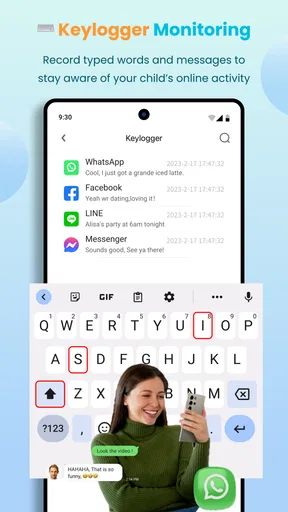
KidsGuard Pro offers a wide range of monitoring features, including call logs, text messages, GPS location tracking, social media monitoring, and access to browsing history. It also provides screen capture and keylogger functionalities. These features aim to give parents a comprehensive view of their child’s digital activities, promoting safer online behavior.


